No Cloud Sync? No Problem.
Stop manually transferring files for older titles, indie gems, and non-Steam games. SaveLocker effortlessly brings modern cross-progression to your PC and Steam Deck, all entirely self-hosted.
Free for personal use · Windows and Steam Deck · No account, ever
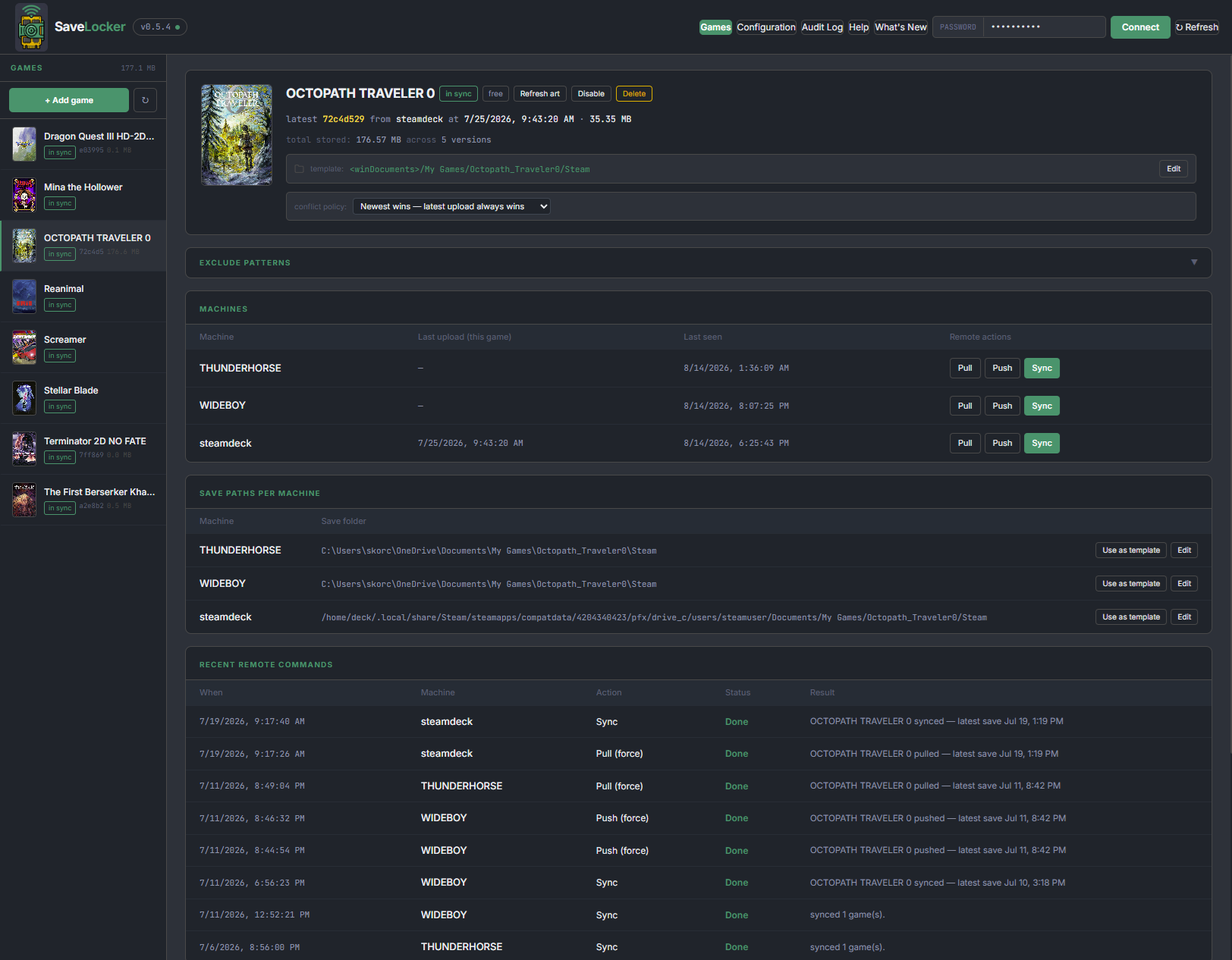
You already know the feeling.
You beat the boss on the Deck. You sit down at the PC. The game loads you in three hours ago.
Steam Cloud only covers games whose publisher switched it on. Older titles, indie games, anything you bought on GOG or Epic, anything you added to Steam yourself — you're on your own. So you copy a folder to a USB stick, or you just play the game on one machine and stop pretending.
Three steps, then you forget it exists.
Run the locker
One container on whatever's always on: a NAS, an unRAID box, a mini PC. It holds your saves and nothing else. There's no service to sign up for and no data leaving your house.
Join your machines
The console hands you a file. You open it on your PC and your Deck. That’s the whole enrollment — there’s no key to copy, nothing to paste, and the file stops working after fifteen minutes.
Play
SaveLocker pulls your latest save before the game launches and pushes it back after you quit. You don’t press anything.
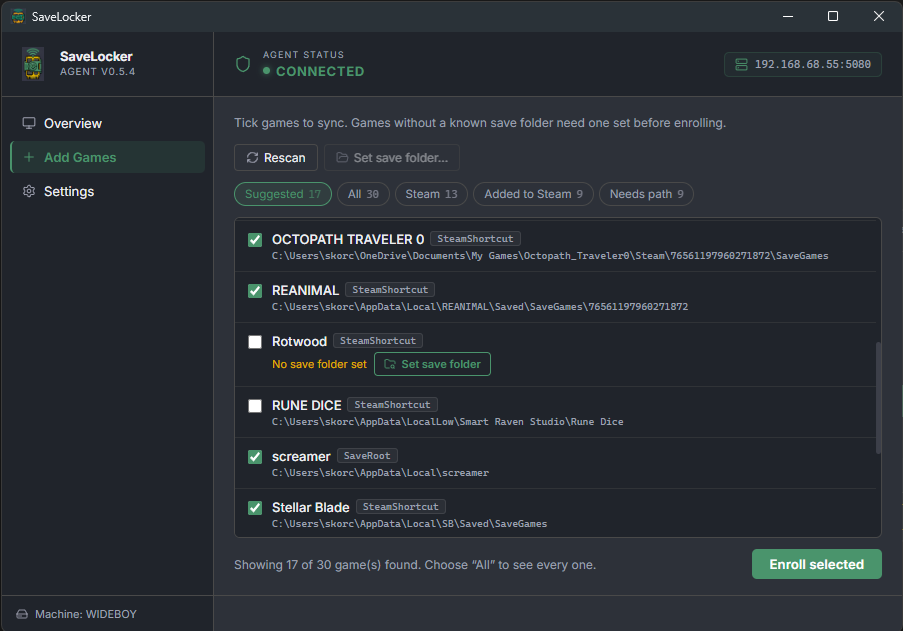
It finds your games for you.
SaveLocker scans your Steam library, the non-Steam games you've added to Steam yourself, and anything staged in Heroic — Epic, GOG, Amazon, sideloaded. Then it looks up where each one actually keeps its saves.
Most of the time, you just tick a box.
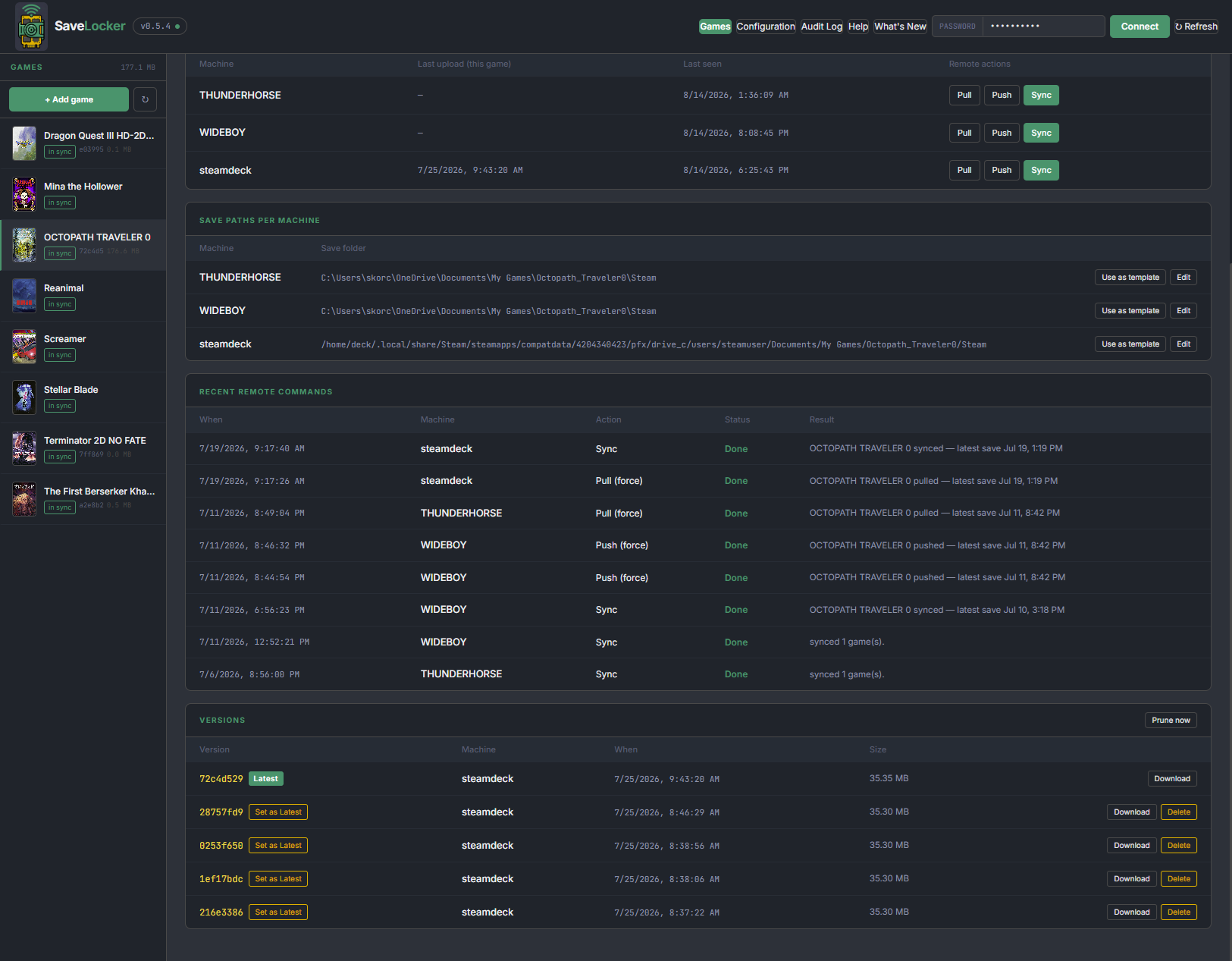
One console for every machine you own.
Every game, every machine, every version, in one page. See which machine last uploaded, what each one thinks its save folder is, and how big the history has grown.
You can drive the fleet from here too — tell the Deck to pull a save while you're sat at your desktop, and watch the result land.
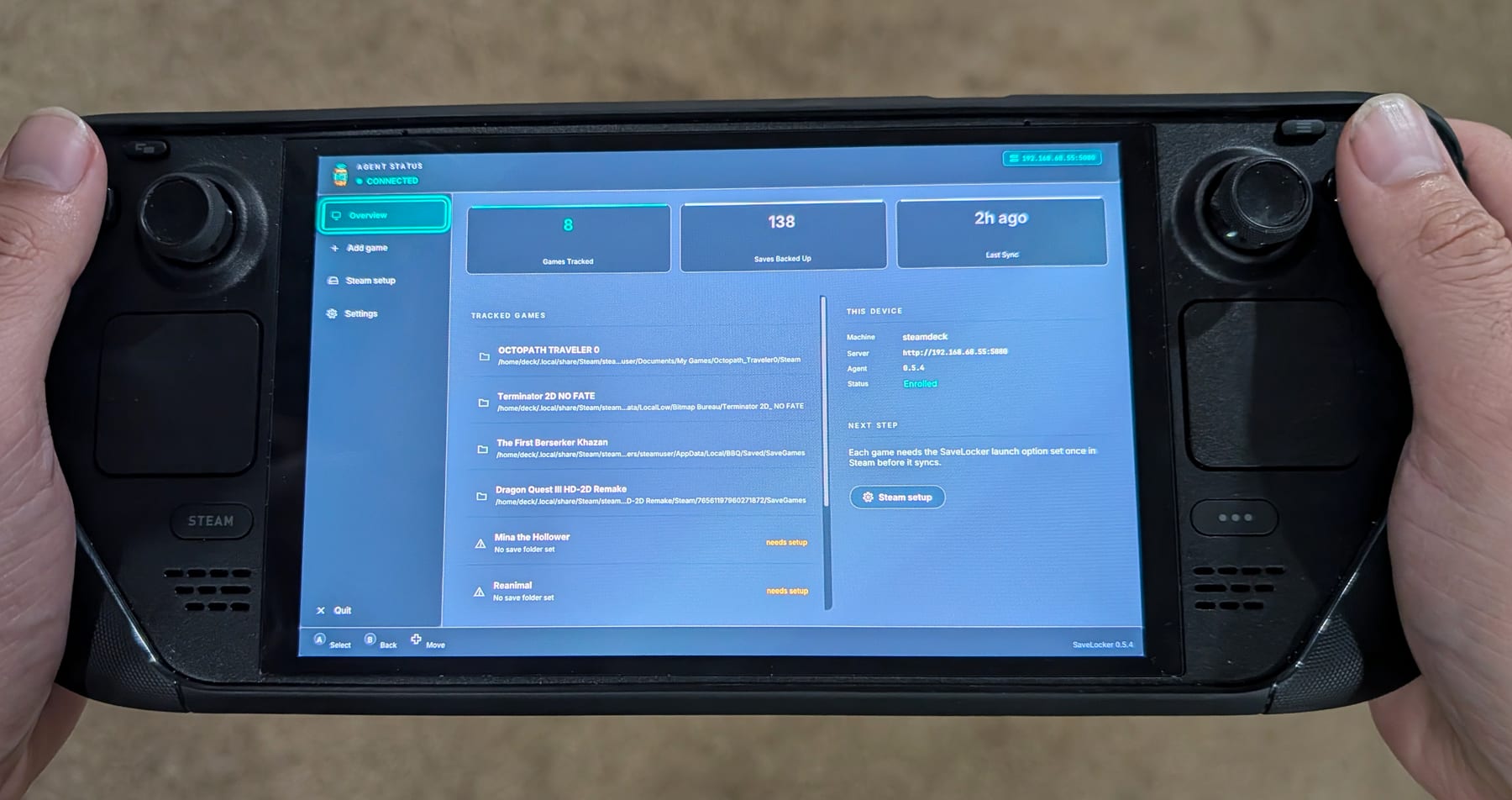
Built for the couch.
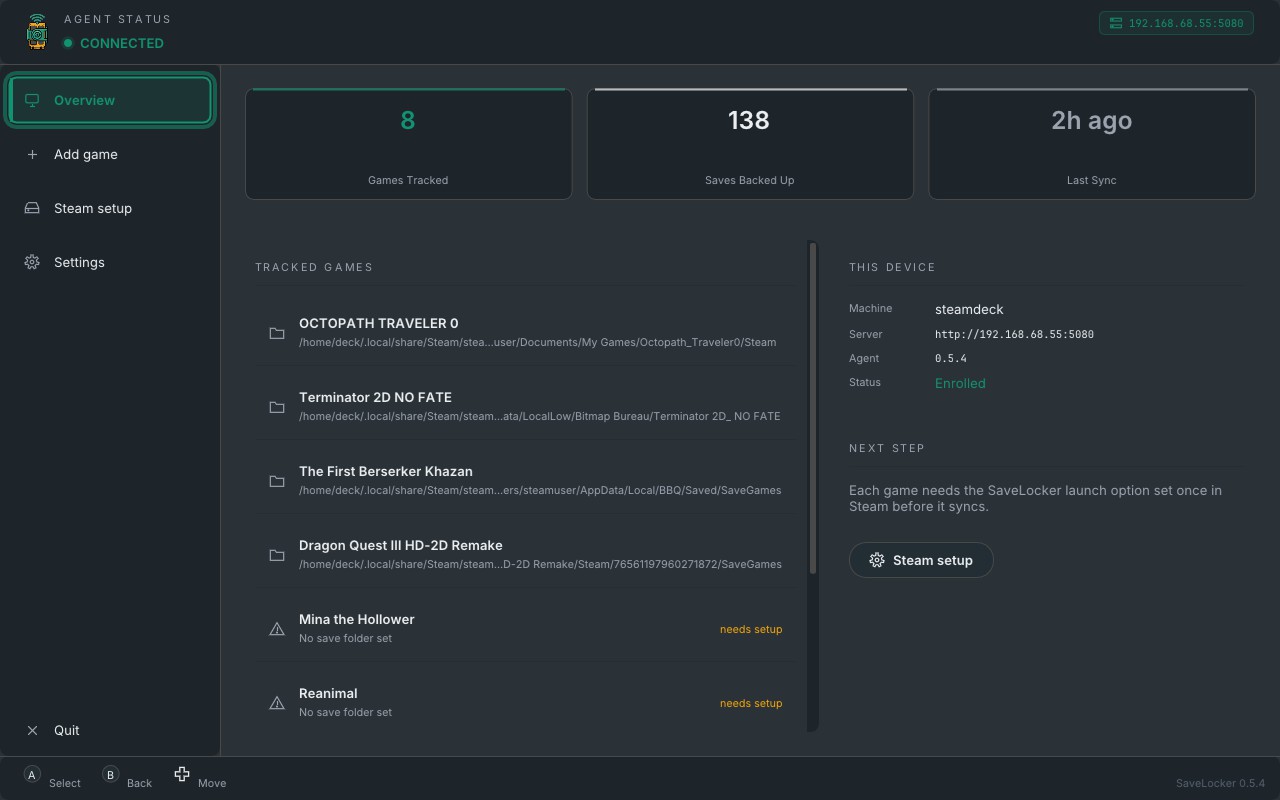
The Deck agent has a full gamepad-driven interface that runs in Game Mode. Add a game, set a save folder, check your sync status — without ever reaching for a keyboard or dropping to the desktop.
No Decky Loader required. It's part of the agent.
Self-hosted doesn't mean home-only.
Put Tailscale, WireGuard or any tunnel between your Deck and your locker and it syncs from anywhere — a hotel, a train, your parents' house. Your saves travel through your own tunnel, not through anybody's relay.
Somewhere with no signal at all? The Deck keeps playing and queues its saves until you're back in reach.
Nothing gets overwritten by accident.
While a game is running on one machine, the others know about it — so the clash gets prevented rather than cleaned up afterwards.
If two machines change the same save anyway, because one of them was offline, SaveLocker notices the saves have diverged, flags it as a conflict, and hands you both options. It will not pick for you, and it will not quietly throw one away.

Rewind to any earlier save
Every sync is kept as its own version. Corrupted your file, or made a choice you regret? Roll back to any point in the history from the console.
One file to add a machine
Enrollment is a single-use file that expires in about fifteen minutes. No API key is ever copied by hand, on any platform.
Keeps working when the server doesn’t
Take the Deck out of the house and it keeps playing. Saves queue up on the device and sync themselves the moment you’re home.
Stays out of the way
A tray icon on Windows, a background service on the Deck. It waits for the game to finish writing before it touches anything, and it tells you when something’s wrong instead of failing quietly.
Updates itself
Point the console at a new Windows installer and the agents take it from there, silently, without you visiting each machine.
It’s yours
Your saves sit on your hardware, in plain zip files, under your own admin password. No account, no subscription, no telemetry, nothing phoning home.
Is this for you?
You'll get on with SaveLocker if you've already got something running at home that can host a Docker container — a NAS, an unRAID server, a spare mini PC — and you play the same games on more than one machine.
You won't if you want something that just works with nothing of your own to run. SaveLocker is self-hosted by design — that's the point of it, and it's the price of it. If you'd rather not host anything, OpenSave does peer-to-peer save sync and does it well.
Away from home is fine. Self-hosted doesn't mean home-only: put Tailscale or any tunnel between your machines and your locker follows you.
Right now it runs on Windows and on Linux, including the Steam Deck. There's no macOS agent yet, and emulator saves aren't supported yet either.
How it compares.
| Capability | Steam Cloud | Syncthing | Ludusavi | OpenSave | SaveLocker |
|---|---|---|---|---|---|
| Works with games that have no cloud save | ✗ | ✓ | ✓ | ✓ | ✓ |
| Runs without a server of your own | ✓ | ✓ | ✓ | ✓ | ✗ |
| Pulls the newest save before the game starts | ✓ | ✗ | ✗ | Deck only, via plugin | ✓ |
| Warns you before two machines clash | ✓ | ✗ | ✗ | ✗ | ✓ |
| Version history you can roll back | ✗ | partly | ✓ | ✓ | ✓ |
| One console for every machine you own | ✗ | partly | ✗ | ✗ | ✓ |
| Push, pull or re-scan another machine remotely | ✗ | ✗ | ✗ | ✗ | ✓ |
| Emulator saves | ✗ | ✓ | partly | ✓ | not yet |
| Saves never pass through anyone else’s machine | ✗ | ✓ | ✓ | on a LAN | ✓ |
OpenSave is the closest thing to SaveLocker and it's good — free, MIT-licensed, peer-to-peer, and it handles emulators, which we don't yet. If you want save sync with nothing to host, install it instead; you'll be happy. Its Decky plugin will also sync around gameplay on a Steam Deck, though that means installing Decky Loader and the plugin on top of the app, and it's Deck-only — on Windows, saves sync when a file changes rather than when a game starts. SaveLocker is a different shape on purpose. It puts a server you own at the centre and gives you a console over the top of it: every machine's health in one page, a version history you can browse, an audit log, and the ability to tell your Deck to pull a save while you're sat at your desktop. That's worth having if you already run a home server and think of your machines as a fleet. If you don't, it's overhead.
Ludusavi is a genuinely excellent backup tool, and SaveLocker leans on its community save-path manifest to find your games — we owe it. The difference is what happens next: Ludusavi backs your saves up, and you decide when and where to restore them. SaveLocker moves them between machines on its own and arbitrates when two of them disagree.
Syncthing will sync any folder you point it at, but it doesn't know what a game is. It can't wait for a save to finish being written, it can't stop the Deck pulling a file mid-write, and when two copies diverge you get a conflict file rather than a decision.
Fifteen minutes to your first sync.
One container, one file per machine, and you're done.